The most common question for the baby products team isn't "should we shoot a video?" but rather, after shooting a video of a spoon, suction bowl, or baby food cup, why do we have to start from scratch again with the product page, advertising, email campaigns, and gift-giving promotions? For baby feeding brands on Shopify, the key is to turn parents’ need for reassurance, first-use concerns, and gifting decisions into separate shot tasks, then give those assets a role in each channel. This helps the production budget deliver more than one attractive hero film.
Help Parents Feel Confident Handing the Product to a Child
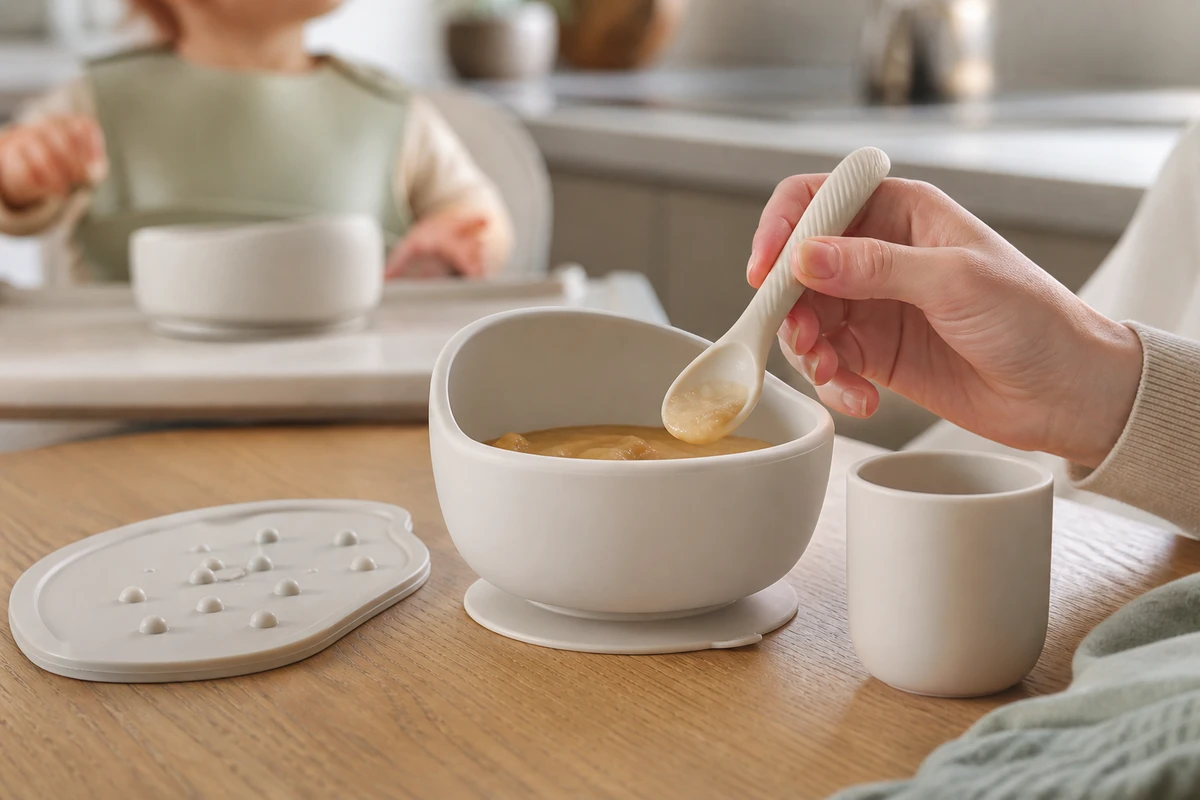
First, let's define the boundaries: videos cannot replace test reports, material descriptions, or product compliance information. However, they can help parents overseas quickly confirm the visible facts that matter most to them: whether it fits comfortably in the hand, whether a light push moves the bowl, whether cleaning is difficult, and what happens during the first feeding. Brand messaging must focus on actions and results, not just displaying "food-grade" or "safe materials" as text on the screen.
In briefs like these, ONCE will start by creating "concern cards": new parents are concerned about ease of use, grandparents and gift-givers are concerned about whether a set is complete, and repeat customers want to know which products go together and how to clean them. Each card corresponds to a specific story angle. A common situation on set is that an insight sounds great, but the shots don't fulfill the task; therefore, it's important to return to the real actions that users take with the product.
Plan the Asset Structure Before Counting Finished Videos
Organize a feeding set into five layers of content assets. The first is the hero frame: the complete set on a clean tabletop, answering “What is it?” The second is a use demo: securing the suction base, filling, scooping, and handing it to the child, answering “How do I use it?” The third is detail evidence: edges, bases, grips, and storage, answering “What makes it easy to use?” The fourth is lifestyle: the breakfast table, outings, and gift unboxing, answering “How does it fit into everyday life?” The fifth is after-sales support and FAQ content: cleaning, product combinations, and specifications, answering “Will it be a hassle after I buy it?”
This isn't about cutting the same footage shorter; it's about planning the shot list in advance. Each layer should have safe compositions for horizontal, vertical, and square formats, so editors do not have to force a crop in post-production. Shopify's product media features support video and other media, and you should confirm whether the theme supports playback and how it will be displayed on mobile devices before storyboarding. Refer to Shopify Product Media Types and Specifications so a beautiful master can actually be displayed on the product page.
Use One Shot List for First Purchases, Add-Ons and Gifts
For the first-purchase version, show the real physical relationship involved in handing over a spoon for the first time: keep the parent’s hand, product, food, and child’s reaction in the same frame, with the product still the main subject. The add-on purchase version does not need another large scene; show how a cup, bib, placemat, or storage bag combines with the main product. The gifting version emphasizes unboxing, the complete set laid out, and the use viewers can imagine, making it immediately clear that this is a complete gift rather than a collection of loose items.
The most easily overlooked aspect is cleaning. Many brands put the cleaning process at the end of a long video, essentially hiding a common concern. A more practical approach is to shoot a separate set of shots showing water flow, disassembly, wiping, and air-drying. These shots can support a product demo, a customer-service FAQ, comment replies, and retargeting assets. Specifications are not the selling point themselves; what users see as "convenient results" is what matters.
Let Product Pages Explain and Ads Create Interest
The purpose of product page videos is to reduce the cognitive load: first, show the entire set; then, arrange key actions according to the product structure; and finally, show the tabletop after use. Short ads have a different purpose; they only need to use a hook to draw viewers into the most relevant questions. For example, "Does the bowl stay in place when the child pushes it?" or "What should you do if you're overwhelmed during your baby's first introduction to solid foods?" These are more effective than starting with a lengthy brand story.
Shopify lists watching an on-site video as an example of a conversion goal a business can define. Plan video alongside add-to-cart actions, checkout, and repeat purchases, rather than reporting views alone. The Shopify explanation of website conversions also highlights clear CTAs, mobile usability, and a smoother shopping process. Even if the main video has high quality, if buttons are obscured or the initial viewport loads slowly, the conversion path will still be disrupted.
Extend One Shoot Into Email, UGC and Campaign Learning
ONCE VISUAL packages the day’s footage by use case—cold start, product page, repeat purchase, and holiday gifting—instead of delivering it only by camera position. Cold-start assets use the visual hook with the clearest problem or tension; product-page assets retain complete operations; email assets use a 5–8-second loop to solve one question; and UGC collaborations can use real parent scenes and product close-ups without pretending the content was spontaneous user material. Keep an original version without subtitles for every asset, ready for localization into other languages for overseas markets.
Campaign review should map back to the shots: if dwell time is low, check the hook and first frame; if there are clicks but few add-to-cart actions, check whether the product-page demo delivers the promise; if users leave after adding to cart, review bundles, shipping, and trust information. Shopify’s Product Demo Guide treats showing a product in action as a bridge between the physical item and the digital page. Use it to check whether each demo explains a real reason to choose the product.
Show Real Use Alongside Polished Baby Product Still Lifes
The four common pitfalls are: showing only a clean tabletop without first use; letting the child occupy so much of the frame that the product structure is unclear; packing every fact into one 30-second video and leaving no testable cutdowns; and turning compliance or safety into unverified absolute promises. During review, replace abstract language such as “we provide a more reassuring experience” with visible actions: how the bowl stays fixed, how the spoon is held, and how cleaning ends.
If your Shopify team is preparing a launch, a bundle, or a holiday campaign, start with the ONCE video marketing column to align the brief, script structure, shot list, and version matrix. Capture the moments children and parents actually encounter first; then the assets can keep working across product pages, social media, and advertising.