A launch arrives with six colors, three sizes, and two functional tiers. The easiest production choice is to place every product in a row, slide the camera from left to right, and give each model the same amount of screen time. The film appears complete, yet viewers may remember only that there are many options. They may not understand why the products belong together or where their own choice should begin.
A product family video has to build a relationship rather than a sense of quantity. Viewers should recognize a shared identity first, understand the value of the differences second, and finally see a clear path through the range. Family resemblance comes from an ordered balance between stability and variation, not from fitting every SKU into one frame.
A lineup is not yet a family
A lineup proves that the products exist at the same time. It does not automatically explain their shared design language or the different roles of color, size, performance, and price tier. If every item faces forward at equal distance and equal brightness, the frame behaves like an inventory page: fair, but without a point of view.
A family video needs to answer three questions in sequence. What makes these products recognizable as one family? What changes from one model to another? Why does that change matter to a particular task, home, or aesthetic choice? The shot order should let those answers emerge, rather than flattening them into a single crowded reveal.
This differs from the problem addressed in our article about the product launch content matrix. A content matrix asks how one creative idea travels across a hero film, feature videos, and short cuts. A product family system works inside the same visual world and asks how multiple SKUs establish identity and hierarchy together.
Define the invariant before choosing the variable
Before production, divide the range into two layers: the features every family member should preserve and the variables viewers are meant to compare.
Invariants let the brand arrive first
An invariant may be a shared silhouette, button proportion, material boundary, opening motion, interface animation, grip, or stable camera distance. It does not have to be the logo, and it does not need to appear in every second. When it recurs across models, viewers can recognize a common product logic.
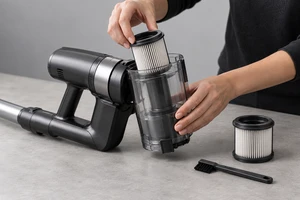
Imagine three cleaning appliances that share the same bin-release action but differ in battery, brush head, and body size. The film can make that action a family signature: the same hand completes a similar release rhythm on each model. The products become connected through behavior, rather than merely through a shared backdrop.
Variables explain why several models need to exist
Color, size, capacity, accessories, ports, displays, and functional tiers can all be variables. A single film should not ask all of them to compete for attention at once. Decide which difference matters most in this communication, then let the others support it.
A color-led range can keep action and framing stable while color changes. A size-led range needs familiar scale references, different grips, or a visible footprint. A feature-led range should place different models against different tasks. A variable becomes meaningful when it enters a real use condition. Otherwise, the film is only an animated specification table.
Models need roles, not equal screen time
Equal duration does not create fair communication. A flagship, core seller, compact model, and special color often serve different commercial jobs. A family video can treat them as a cast of roles instead of products waiting to be called one by one.
The lead model can establish the world and the core action. The entry model can lower the barrier to understanding. The advanced model can carry additional capability. Color variants can widen the sense of personal choice. These roles can change, but the script should name them. Without a hierarchy, a flagship may lose its authority through too little attention, while an entry model may be framed as a cheaper miniature.
Hierarchy also does not mean placing the flagship in the center every time. If the launch is about a new finish, the special color may open the film. If the story is about a small apartment, the compact model may become the protagonist. The communication problem determines the current role; the product spreadsheet does not.
Four shot relationships can show both family and difference
Every SKU does not need an isolated set of unrelated hero shots. The stronger approach is to design relationships between products.
A family portrait establishes the common boundary
A portrait helps viewers register the number of members, the shared silhouette, and the overall color system. Height, depth, and orientation can create hierarchy, but composition should not distort the real size relationship. A close wide-angle view can exaggerate the front product, while a long lens may compress meaningful size differences. Focal length and camera position should follow the relationship the portrait is meant to explain.
An action relay connects shared structures
One model can begin a button press and another can complete the opening action. One product can turn toward profile while the next enters along the same direction. An action relay turns shared design into a temporal relationship. The cut should land on similar geometry or similar physical force, not use a color flash to hide mismatched controls and contact points.
A detail comparison isolates one difference
A consistent camera position, similar light, and the same hand action can help viewers compare capacity, display, port, or accessory changes. One comparison should answer one question. If angle, gesture, background, and focal length all change together, the viewer cannot tell what produced the difference.
A role-based ending shows who each model is for
The film does not have to end with a perfect row. It can return each model to the use relationship that fits it: the compact model enters a small space, the advanced model handles a more complex task, and the special finish appears in a more expressive setting. This ending should not choose on behalf of the audience. It should make the basis of choice visible.
Consistent color does not mean forcing every model to look the same
Multi-color products often suffer from two opposite errors. Production conditions change and make the same finish swing warm or cool between shots. Then post-production tries to create consistency by erasing the legitimate differences between materials and colors.
The International Color Consortium's guidance explains how device profiles connect camera, display, and output data through a standard reference space. Adobe's current Photoshop color-management documentation, updated October 7, 2026, describes preserving or correctly converting embedded profiles so files are not misinterpreted in a different working space. Capture One's Normalize tool documentation explains how a reference region can establish a common exposure and white-balance starting point across images captured under comparable conditions.
These tools manage interpretation; they do not replace judgment against the real sample. A matte warm white and a glossy cool white can feel different even when measured values appear close, because their reflection, curvature, and environment differ. The set should retain a neutral reference, shared lighting records, and a physical comparison for every SKU. Post-production should correct unintended drift first, then preserve the differences created by actual material.
Our earlier article on polarization in product advertising explained why removing every reflection can also remove the finish. Across a whole color range, that risk multiplies: one polarizer and fill-light setting cannot be copied mechanically across gloss, matte, transparent windows, and metal trim.
Movement should not turn the range into a rotating catalog
If every model makes one full rotation on the same turntable, the audience receives a complete exterior view but not necessarily a reason to compare. Movement should clarify a relationship.
When shared silhouette matters, every model can travel along the same path. When size matters, the products can perform the same action beside a stable scale reference. When accessory compatibility matters, an accessory can pass from one model to another. Repeated movement creates comparability; changed movement explains a changed role.
Editing also needs a short common baseline. Three rapid color transformations may feel energetic but make finish and color differences hard to inspect. Let one model exist long enough to become a reference, move through the changes, and then return to a comparable family frame. The sequence can remain fast while still giving viewers something stable to judge.
CG and AIGC can expand the stage but should not rewrite identity
CG is useful for clarifying size relationships, internal structures, modular combinations, and transitions that are difficult to shoot. AIGC can explore backgrounds, seasons, lifestyles, and format extensions, allowing the same range to enter more outer contexts.
The risk is that generation tools readily average button spacing, port counts, curvature, material boundaries, and subtle differences between named colors. The more convincingly the products resemble one family, the more easily distinct model facts can become blended.
In a hybrid workflow, the generated layer can carry the shared environment, atmosphere, and movement path. Each SKU's silhouette, interfaces, labeling, hand contact, and functional result should remain in verifiable live-action or controlled 3D layers. Every generated variation should return to the model sheet and physical reference. Looking plausibly related is not enough to confirm identity.
One shoot should preserve relationships that can be recombined
A family production should deliver more than one hero film containing every model. Reusable footage includes a clean family portrait, an isolated hero shot for each SKU, same-angle versions of the shared action, comparisons built around one variable, transitions that survive horizontal and vertical crops, and clean product actions with their real sound.
Those assets can support the hero film, product pages, retail screens, social cutdowns, and later color additions. The goal is not an unlimited number of files. Each asset should be tagged with the family invariant it proves, the variable it reveals, the models it applies to, and the formats in which it remains valid.
ONCE's product video production can place model roles, shared actions, color references, and channel uses inside one shot plan. A single production can then retain both family identity and the selling value of each SKU.
Turn the model sheet into a relationship map
When the next long SKU list arrives, do not begin by assigning seconds to every item. Circle the identity cues shared by every member. Choose the one variable this launch most needs to explain. Give each model a role in the story. Then decide which products must appear together, which comparisons require the same camera position, and which models need an independent hero frame.
If you are planning a family launch for appliances, consumer electronics, personal-care devices, pet products, or lifestyle goods, send the samples, model sheet, color references, and channel requirements to ONCE VISUAL. We can establish the relationship between products first, then turn it into footage that can be recombined across hero films, commerce, and social media.
Sources and scope
This article was checked on October 27, 2026, against the International Color Consortium's color-management FAQ, Capture One's Normalize tool overview, and Adobe Photoshop's color-management policy documentation. Product colors, materials, model structures, and functional differences should always follow approved samples, engineering information, and brand color references. This article addresses advertising and production choices; it does not replace product specifications, color certification, or quality inspection.