The moment a cable enters the frame, it rearranges the image. Where a charging lead connects, how far a vacuum hose reaches, and how a tool cord passes around the operator all shape the viewer's judgment of usability. Many product videos treat cables as clutter to hide. The product looks cleaner, but real use becomes harder to understand.
Filming cables in product videos means making a soft, mobile, easily tangled object communicate reach, flexibility, connection, and storage. This is more than prop styling. It is action design.
A cable defines where an action begins and ends
A wireless product can be picked up and carried away. A corded product comes with a path. One end connects to the product; the other may connect to power, a controller, a host device, or an accessory. Show only the product body and viewers may understand its form without understanding how it starts working.
Before the shoot, decide what the cable needs to explain. It may clarify the power relationship, demonstrate working reach, form part of installation, or complete the ritual of putting the product away. Each task gives the cable a different place in the composition.
Make the connection legible within one action
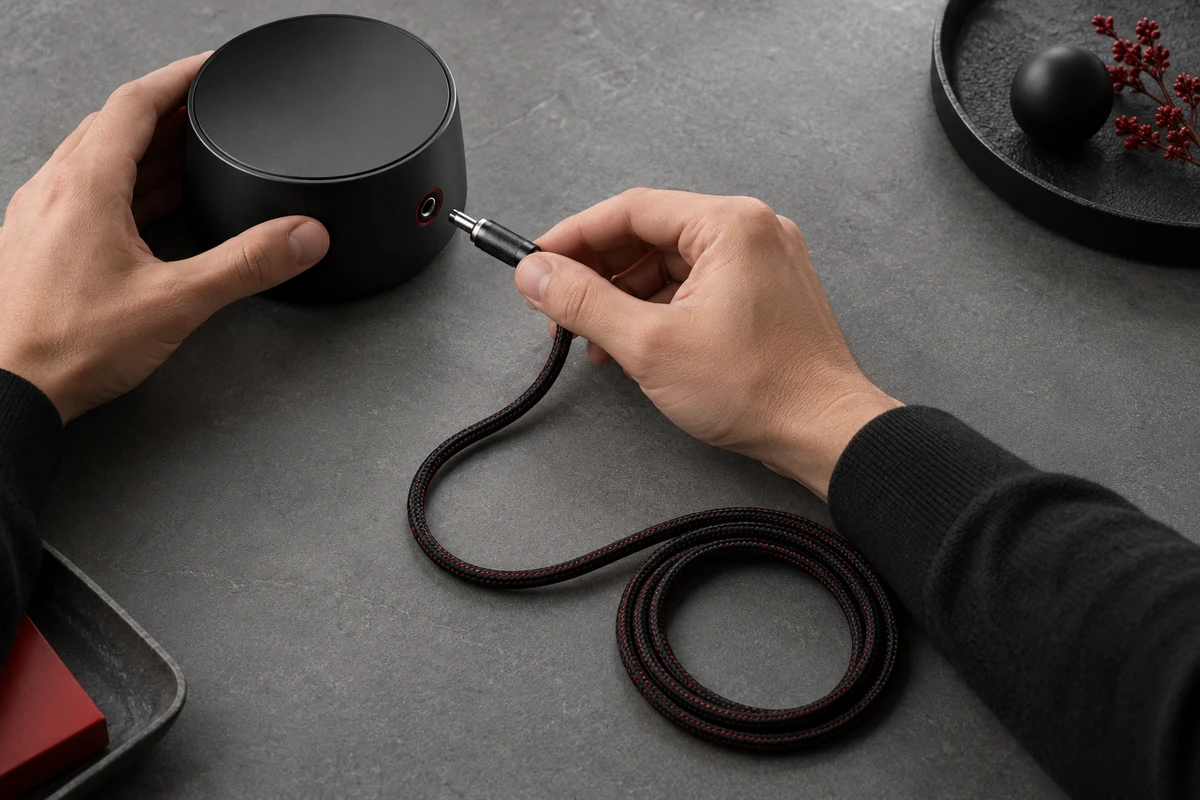
If one shot shows the port and the next suddenly reveals a connected lead, the information is present but the cause is missing. A clearer action keeps the hand, connector, port, and a short length of cable visible together. Viewers see alignment, insertion, and the direction in which the cable leaves the product.
Treat the cable as a directional line
A cable naturally pulls the eye toward the edge of the frame. Let it leave the product in the direction of the action and the image feels purposeful. Let it cross the user's wrist, a key surface, or an important structural detail and it reads as clutter. Cable styling is less about making every segment straight than deciding where it should lead the eye.
Show length through space, not just a caption
“Two metres” is a specification. The image still has to show what that distance means in use. A desk edge and wall socket, one end of a workbench and the other, or the path from behind a sofa to a cleaning point can all provide understandable spatial references. One purposeful movement often communicates working range better than an isolated number on screen.
The reference must come from real use. Pulling a cable to its limit, moving a socket to an implausible position, or exaggerating depth with a wide lens can make the product seem less credible. If the exact specification has not been confirmed, the scene may show that the cable reaches a real position, but it should not imply a precise distance.
Flexibility is not a contest in extreme bending
A soft cable sags, rebounds, twists, and remembers how it was coiled. Product videos sometimes whip it through the air to create energy. Once the movement exceeds normal use, the viewer sees a controlled prop rather than an easy product.
A more credible bend comes from a clear action: the user turns the device, a hose passes around a table leg, a connector approaches its port, or the cable returns to storage. The shape changes step by step, so flexibility reads as useful allowance. With a locked-off camera observing product action, that change is especially easy to compare because the camera is not creating the sense of speed.
Keep gravity and a little imperfection
A cable that lies perfectly flat with identical curves can look held by invisible fixtures. Natural sag and a small rebound reveal the material more honestly. If the product has defined bend, load, or safety requirements, the action should follow its real instructions and sample conditions. A commercial shot cannot replace durability testing, and one bend should never imply long-term reliability.
Insertion shots need the hand, port, and slack together
Insertion often looks difficult because the action has no room, not because the connector is small. A hand blocks the port, the cable suddenly pulls tight from off screen, or the connector changes orientation across an edit.
Build the action in three beats: the hand holds the connector rather than pulling the cable; the connector approaches in the correct orientation; and the connected cable retains natural slack. The beats do not need three separate shots, but the footage should preserve all three. If the scene includes a slight misalignment and correction, keep the emphasis on product feedback and recovery rather than turning a small mistake into humiliation or a gag.
Track the cable's memory for continuity
The landing point on the table, connector direction, number of coils, and slack in the user's hand can all change between camera positions. Mark important positions outside the frame and photograph a continuity reference for every setup. Otherwise the product stays still while the cable switches sides, creating an interruption viewers may feel even if they cannot name it.
Storage is the ending of the product action
Cutting directly from disconnection to a clean hero frame misses a valuable ending: how the product returns from working state to ready state. Winding, clipping into a channel, returning to a magnetic point, entering a pouch, or wrapping around the body can turn “finished” into a satisfying action.
The storage shot must respect the real structure. A product without a guide channel cannot make the cable conform by itself, and an ordinary connector should not appear to attach magnetically. Styling aids may help maintain a shape, but they must not change the viewer's functional judgment and should be documented. One attractive coil proves only that this take was arranged well; it does not prove every user can do it equally quickly.
Different products need different cable stories
Consider fictional shoot scenarios. A desktop charger may emphasise a clear path from power to device, making the connector part of an orderly workspace. A handheld cleaner can use the user's movement to show hose reach while preserving natural tension around turns. A power tool should keep its cord clear of the operator's hand and movement, so the action remains easy to understand.
The same sequence—straighten the lead, plug it in, coil it at the end—cannot serve every product. The brand first needs to identify the viewer's main uncertainty: Is it long enough? Will it get in the way? Is the connector easy to identify? Where does it go after use? A short video should answer the most important one or two questions, rather than performing every possible benefit.
Rehearse the cable before the camera rolls
Before the formal shoot, record one complete real operation on a phone: connection, movement, use, and storage. Review only the cable. Note where the hand hides it, when it becomes unexpectedly tight, whether it crosses an important feature, and which landing points must survive a camera change. Use that pass to set the camera, hand movements, cable shape, and continuity references.
This rehearsal also separates functional truth from visual cleanup. The script and set notes should state which actions come from the actual product, which choices merely tidy the image, and which durability or safety meanings the commercial cannot establish. ONCE's product and brand film team can translate that path into a shootable action design. If your product includes cables, hoses, or detachable connectors, share the sample and real use case through our product video production solution, and we can discuss the action viewers most need to understand.