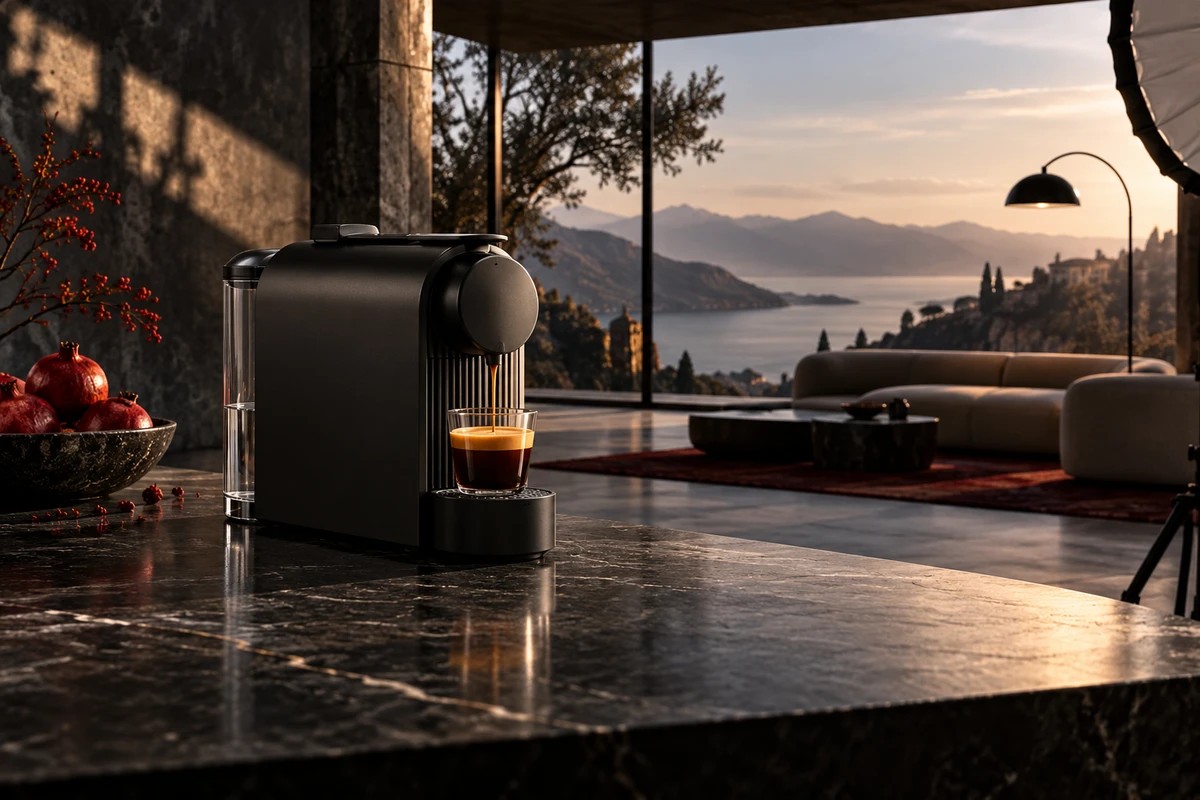
Placing a live-action product inside an AI-generated background can look complete at first glance. The space, lighting, props and mood are all present, and the product is clear. Yet after two seconds, the product may still feel pasted into the frame. The problem is rarely a lack of background detail. The product and the space have not formed a relationship.
Realism does not come from stacking two attractive images. The product must press into a surface, receive environmental light, reflect nearby objects and share the same depth and camera logic as the scene. When those relationships contradict one another, a more detailed background can make the mismatch easier to see.
Product realism comes from spatial relationships
A generated scene can contain detailed walls, a complete view through the window and carefully arranged decor. Those details do not automatically make the product believable. Viewers rely on more direct cues: where it stands, how much space it occupies, how its weight reaches the surface and how the surrounding light touches it.
The first compositing question is therefore not whether the background looks beautiful. It is whether the background explains why the product appears at this size, angle and brightness. That is both a photographic relationship and a storytelling relationship.
Perspective mismatch puts the product in another camera
The camera height, tilt and focal length used for the product determine the table lines, the visible area on top of the object and the compression of its shape. If the AI background feels wide-angle while the product was photographed with a longer lens, the space expands while the product remains compressed and calm. They appear to come from different cameras.
Keep the live-action camera conditions and generate the scene around them. Table edges, wall corners, window frames and props become perspective references. They do not need to be mathematically perfect, but their directions must give the product a convincing place to stand.
Contact shadow gives the product weight
A product can begin to float when a credible contact shadow is missing from its base. The shadow should not be a generic soft black oval. It needs to respond to the base shape, key-light direction, surface roughness and distance from the tabletop.
A small direct source produces a more defined edge, while a large soft source creates a gradual transition. Feet, gaps and small changes in the surface also create local darkness. Preserving these cues lets the product hand its weight to the scene.
Reflective materials reveal whether the environment exists
Glossy plastic, metal, glass and screens do more than reflect a lamp. They compress the entire environment into their surfaces. If the background contains a large window while the product highlight still looks like a closed studio, or warm wood surrounds a metal edge with no warm reflection, the product and scene separate.
This is why highly reflective products are harder to place in generated backgrounds than matte objects. Compositing must review highlight shape, environmental color and reflection direction, not only the background grade. Sometimes it is better to simulate the future environment with controlled reflectors during the shoot than to leave every match for post-production.
Matching light direction is only the first layer
A bright left side on both product and background solves only the broadest mismatch. A real scene also has source size, distance, color temperature, bounce and occlusion. A cloudy window should not create a tiny hard highlight. A cool room should leave some environmental color in the product shadows.
Treat the background as a lighting plan. Identify the key source, the walls that bounce light, possible rim light and any tabletop color reflecting into the base. Then decide what belongs to practical lighting, local grading or compositing relight.
Depth of field must imply one viewing distance
Some images have correct perspective but conflicting sharpness. Every product edge is extremely crisp while the background becomes heavily blurred at the tabletop, or the scene holds dense microtexture while the product keeps a soft studio outline. Either can create a cutout feeling.
Record the aperture, focus position and camera-to-product distance during capture. These details help determine where the generated background should begin to soften. Review the result at its actual publishing size because sharpness feels different on a phone and in a large review monitor.
Interaction traces prove the product is present
A product placed alone on a surface can still look like it sits in front of a replacement backdrop. Small traces of interaction make the placement stronger: a cable bends across the table, the package holds down a sheet of paper, fingers overlap an edge, steam moves around the body, or a nearby object receives a faint glow from the screen.
These traces should be few and physically consistent. They tell the viewer that the product does not merely appear in the scene; it changes the scene. In TVC and brand campaign production, this relationship can carry more narrative value than additional background decor.
Shooting first still requires a scene hypothesis
A hybrid workflow should not begin with an isolated product cutout and no direction. Before production, define a scene hypothesis: a kitchen island or bedside table, the approximate window side, the surface height and material, whether a person enters the frame, and whether the final asset is horizontal or vertical.
Those conditions guide camera position, focal length, lighting and the contact surface. They also constrain background generation so the process does not drift through dozens of unrelated spaces. ONCE's e-commerce product video approach shows different ways to connect product action, use context and commercial imagery.
AI backgrounds can extend a world but should not replace product facts
AI backgrounds are useful for extending difficult spaces, exploring atmosphere or placing one product inside several communication contexts. They work especially well when the product itself has been captured accurately and the background mainly carries mood, cultural context or an imagined use environment.
When an ad must prove dimensions, structural connections, safety clearances, transparent internal relationships or exact operating steps, the background cannot obscure those facts. Product shape, ports and action results that affect customer understanding should remain grounded in the real sample and reviewable footage.
A practical live-action and AI background workflow
Define the scene hypothesis and delivery formats first. Record the camera position, focal length, light placement and surface during the product shoot. Generate a small number of backgrounds that follow those photographic conditions. In compositing, solve perspective, contact shadow, environmental reflection, depth and grain before using a global grade to hide structural mismatches.
Add a few interaction traces and review the image at its actual media size. During review, temporarily reduce the background to the product, surface and key-light relationship. If those three still work, bring the atmosphere and decor back. This reveals which layer is weakening realism.
Make the generated scene part of the product world
A good AI background does not need to prove that it was generated, and it does not ask the viewer to ignore contradictions between object and space. It should feel like a credible art-direction and lighting choice that expands the product world while preserving the shape, material and function of the real sample.
If you are planning a campaign that combines live-action products with AI environments and need to balance efficiency, realism and versioning, contact ONCE to discuss product capture, background generation and compositing tests.