Why archiving determines update speed, not editing speed
After delivering a commercial video project, the most common requests are modifying subtitles, replacing footage, adjusting duration, or adapting for new platforms. If the team spends time searching for assets, verifying versions, or re-exporting masters, updates will inevitably be slow. Archiving is the critical first step when initiating the next update. Archiving quality directly determines whether you can complete revisions in half a day or must restart the entire production process.
There is a simple standard for determining if archiving is adequate: Can a new team member independently locate the original footage, corresponding timecode, color grading version used, and final output settings for any given shot without consulting the original team? If not, the archiving has failed. Brands should include archiving requirements in contracts during project initiation rather than adding them after final delivery.
Specific actions include defining the archiving lead, file formats, storage locations, and acceptance deadlines at the project kickoff meeting. The archiving lead may be a production assistant or post-production coordinator, but a single point of responsibility must be designated. Archiving should occur within three business days of final delivery, rather than being delayed until month-end. Delayed archiving risks permanent loss if original footage is purged, memory cards are formatted, or staff depart.
Footage reuse scenarios must be clearly defined during the project initiation phase.
Effective footage reuse for commercial video requires strategic planning at project inception. Brands must answer three questions: What updates might be needed within a year, such as new intros, subtitles, product packaging, background music, or localization for overseas platforms? Which shots are core assets worth separate archiving, such as product close-ups, signature brand scenes, or interviews? Which elements are temporary and require distinct labeling due to frequent updates, such as event dates, promotional pricing, or specific talent appearances?
During preparation, brands must provide communication goals, audience personas, key selling points, visual references, and a list of delivery platforms. This information helps the production team determine which assets require high-spec retention versus compression. For example, if social media delivery requires both vertical and horizontal versions, framing must accommodate both during shooting, and project files for both aspect ratios must be archived.
The production team must confirm whether proxy files will be used for editing, if original footage will be stored on dedicated drives, if color management workflows will be applied, and if audio stems will be preserved on separate tracks. These decisions directly impact future editing flexibility. Editing without proxies may cause playback lag during revisions, while retaining only a mixed audio track necessitates a full remix to adjust voiceovers or music.
For low-budget, fast-turnaround projects like three-day short videos, archiving may be simplified to retaining only the final master and raw footage. Even in simplified workflows, a project documentation file recording shoot dates, locations, key equipment, talent details, and copyright ownership must be preserved.
How to capture archival metadata on set
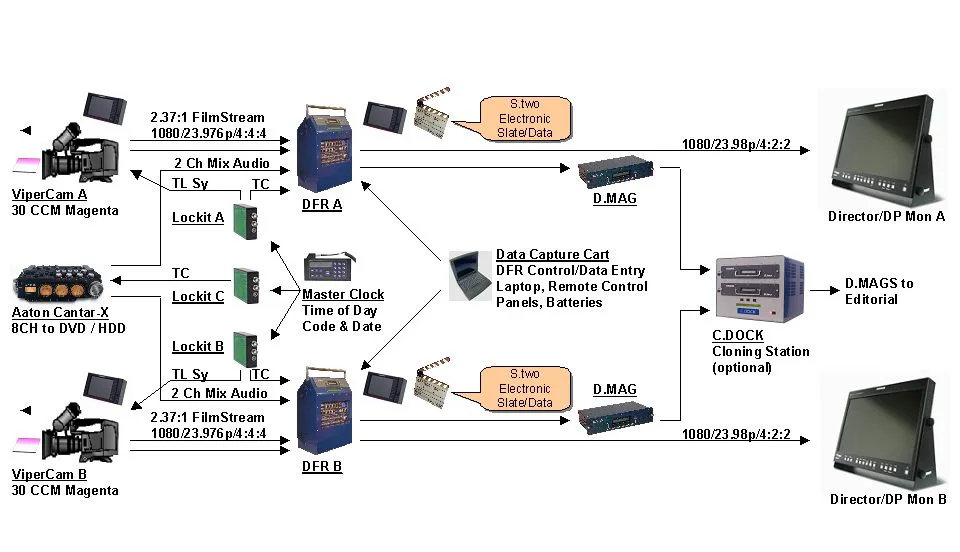
On-set media management directly determines archival completeness. Cinematographers and DITs must simultaneously maintain camera reports during shooting, documenting scene numbers, shot numbers, take counts, content descriptions, and usability status for each shot. Camera reports serve as the index for post-production archiving; without them, footage becomes an unorganized collection of files.
Specifically, after each shooting day, the DIT must copy footage from memory cards to at least two separate hard drives—one for editing and one for archiving. Checksum tools must be used during transfer to ensure file integrity. Footage should be organized according to a preset folder structure, such as hierarchies by date, scene, and shot number. Folder naming must be standardized (e.g., 20250525_SC01_Take03), avoiding Chinese characters or special symbols to prevent cross-platform compatibility issues.
Technical parameters must also be recorded on set, including camera model, lens focal length, aperture, shutter speed, ISO, color space, frame rate, and resolution. These parameters are critical for post-production color grading and compositing. For multi-camera shoots, synchronization methods for all cameras, such as timecode or slate sync, must also be documented.
A common risk on set is overlooking audio archiving. If recording equipment is separate from the camera, audio files must be backed up independently with corresponding video timecodes logged. Without synced audio, lip-syncing in post-production becomes extremely difficult. Additionally, if shoots involve actor likeness rights or location permits, release forms must be signed on-site and archived together; otherwise, footage may become unusable for future updates.
An exception applies when using AIGC assets, such as virtual scenes or digital humans. When archiving, retain generation parameters and prompts alongside output files to facilitate future adjustments. However, copyright issues for AIGC assets are more complex and require separate confirmation of licensing scope.
Establish a traceable version chain during post-production.
Post-production workflows—including editing, color grading, sound design, subtitling, and VFX—generate numerous intermediate versions. Disorganized version control makes it impossible to identify the final cut during updates or revert to previous versions after modifications, leading to rework. Establishing a traceable version chain is central to effective archiving.
Specifically, output filenames should include the project name, department, version number, date, and editor initials (e.g., Project_Edit_V03_0525_ZY). Maintain a version log within the project folder detailing changes, timestamps, authors, and approval status for each version. Clients may request this log as a deliverable during acceptance.
Retain both original and packaged editing project files. Original projects contain all media links and effects, while packaged projects consolidate all assets into a single folder for easy migration. When using Adobe Premiere, Final Cut Pro, or DaVinci Resolve, export backup project files and record the software version, as compatibility may vary across versions.
For color grading, preserve graded versions and the original color space. If using LUTs or color management, save LUT files and screenshots of grading nodes. This allows existing grades to be reapplied directly if only the edit changes, avoiding re-grading. For audio, retain individual stems—including dialogue, music, SFX, and ambience—as well as mixed stereo and surround versions. Subtitles should be saved as editable SRT or ASS files rather than burned into the video.
A major risk is retaining only the final master without intermediate files. Modifying a single shot then requires re-editing, re-grading, and re-mixing at significant cost. The benchmark is simple: if updating a 10-second clip takes longer than one hour to complete and export, your archive is incomplete.
Archive concurrently with delivery, not after acceptance.
Commercial video deliveries typically include multiple versions, such as landscape, portrait, various durations, and different subtitle languages. Archiving simultaneously with delivery ensures all versioned files are completely preserved. Waiting until after acceptance risks omitting certain versions or files.
Specifically, the delivery checklist must define the format, resolution, codec, bitrate, frame rate, audio format, and subtitle language for each version. Upon delivery, the production team should package the final video, master file, source files, project files, asset folders, shot logs, version logs, and licensing documents together, organized according to the agreed archiving structure. Upon receipt, the brand must verify the completeness of the archived files rather than simply confirming that the final video plays.
Acceptance checks should be categorized by content type: final video acceptance verifies visuals, audio, subtitles, color, and pacing; master file acceptance confirms technical parameters meet platform specifications; source file acceptance ensures all raw footage and project files are included; and archive acceptance checks for file completeness, standardized naming, and complete version records. Each stage requires clear acceptance criteria, such as ensuring the final video has no black frames, audio has no distortion, and subtitles contain no typos.
Materials to be prepared by the brand include the latest platform specifications, such as resolution, frame rate, bitrate, and subtitle formats; since these change frequently, always refer to official requirements prior to publishing. Copyright information must include music, font, and likeness licenses. Brand guidelines should cover logo dimensions, colors, and typography rules. The production team must verify the completeness of these materials and retain a copy during archiving.
A key risk is that if the brand fails to provide platform specifications, the production team may output to generic standards, rendering the deliverables unuploadable. Therefore, target platforms must be confirmed during project initiation and specified in the contract. An exception applies if the project is strictly for internal training or meetings and will not be published externally; in such cases, platform specifications may be simplified, but archiving requirements must remain comprehensive.
Archive Storage Management and Security Policies
Archival storage prioritizes long-term preservation and regular integrity checks. Commercial video assets can consume significant storage space, and media failure or loss renders all archiving efforts futile. Therefore, archival storage must follow the 3-2-1 rule: maintain at least three copies on two different media types, with one copy stored offsite.
In practice, use a NAS or server for primary storage to facilitate team access; use external hard drives or tape for backup storage with regular updates; and use cloud storage or an offsite drive for remote storage to mitigate risks like fire or theft. Inspect storage devices quarterly to ensure data readability. Additionally, maintain an archive index recording each project's storage location, file size, modification date, and access permissions.
Security policies include setting access permissions so only authorized personnel can modify or delete archived files; enabling version control to prevent accidental overwrites; and regularly migrating critical files to new media due to limited hard drive lifespans. If the brand entrusts storage to the production team, the contract must clearly define data custody responsibilities and retention periods, such as retaining data for two years post-project and specifying whether to delete or transfer it upon expiration.
A common risk is relying on a single portable hard drive for archiving; if it fails, the data becomes unrecoverable. The litmus test is whether you can fully restore a project from another copy if a drive is lost; if not, the storage strategy is inadequate. An exception exists for extremely small projects, such as those with only a few shots, where a single cloud backup may suffice, provided regular checks are still performed.
Applicable Boundaries and Exclusions for Archiving
Not all commercial videos require full archiving. Archiving requires time and cost; for one-off videos with no planned updates, archiving can be simplified to retaining only the final deliverables and raw footage. However, applicability depends on whether the project features multiple versions or update needs, reusable assets, complex post-production workflows, or long-term preservation as a brand asset.
Inapplicable cases include temporary event videos, such as conference recordings or internal event highlights, where low update probability makes archiving costs exceed benefits; highly time-sensitive ads, like promotional videos where assets may become obsolete after the campaign; and purely AIGC-generated videos with limited archival value if generation is non-reproducible and copyright ownership is unclear. Even when inapplicable, retain project documentation and final deliverables to prevent legal disputes.
For projects suitable for archiving, brands must assess whether archiving costs fit within budget. Archiving costs include storage fees, labor hours, and management expenses. If budgets are tight, reduce archiving scope by retaining only final deliverables and project files without raw footage. Before reducing scope, acknowledge the risk that specific shots may be irreplaceable during future updates.
Another boundary is that archiving does not mean indefinite storage. Brands should set retention periods, such as three or five years, and re-evaluate upon expiration. If projects are no longer active, delete or transfer assets to cold storage. Confirm there are no legal or contractual retention requirements before deletion.
Make archiving the starting point for your next update.
Archiving focuses on serving as the starting point for future updates. When brands request modifications, production teams should quickly retrieve archived files to edit existing versions rather than starting from scratch. Achieving this requires planning at project initiation, documentation during filming, maintenance in post-production, synchronization at delivery, and secure storage.
Brands should attach archiving requirements to contracts at project kickoff, specifying content, formats, storage methods, and acceptance criteria. Production teams should proactively provide an archive inventory at project completion and demonstrate how to locate assets and versions. If feasible, conduct an archiving drill simulating a shot replacement to verify archive usability.
The ultimate value of archiving is risk reduction, time savings, and brand asset protection. While archiving does not directly improve video quality, it enables rapid response to market changes and smoother updates. Do not wait until updates are needed to realize the importance of archiving; treat it as critically as filming and editing starting with your next project.
If you are preparing a commercial video production project, organize your brief, visual references, product or corporate materials, delivery platforms, and licensing scope first, then review theVideo Production Solutions page, translating abstract preferences into actionable production boundaries.