The key function of reference frames is to establish project coordinates.
In color grading projects, reference frames primarily serve to create a traceable coordinate system for the entire project. Brands often view references as preferred styles, while production teams treat them as technical benchmarks. Without unified criteria, post-production will involve repeated trial and error.
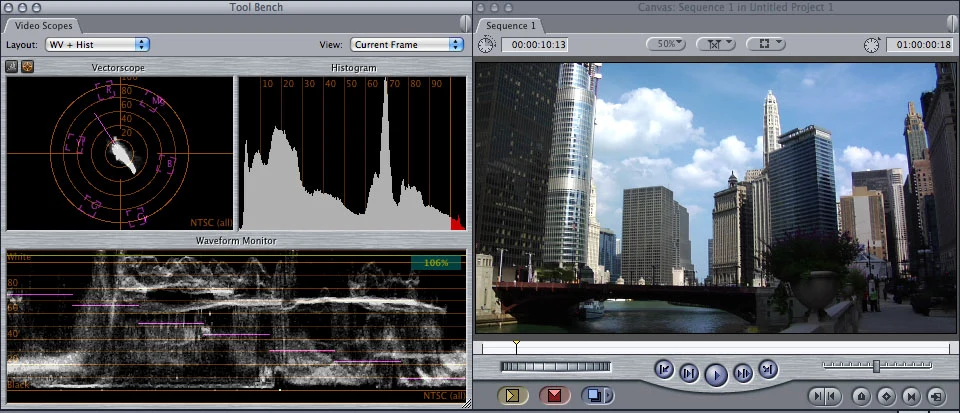
During project initiation, brands should provide three types of references. First, communication objective references specifying the platform, target audience, and intended emotional tone. Second, visual style references, which may include film stills, commercials, photography, or satisfactory footage from previous videos. Third, technical constraint references, such as camera models used, Log curve availability, and on-set lighting conditions.
Upon receiving references, the production team should prioritize a reference frame breakdown. Annotate brightness range, contrast, color cast, skin tones, shadow detail, and highlight gradation in the reference images to create a written brief. Send this brief to the brand for confirmation to ensure alignment and prevent post-production ambiguity.
If the brand only mentions liking a certain style, the production team must proactively ask about specific scenarios. Clarify whether the preference is for neon night scenes, soft daylight, or skin texture. This inquiry process serves as project risk control, preventing references from remaining purely verbal.
Reference frame formatting also matters. Avoid sending only links or online screenshots; provide downloadable high-resolution stills, ideally with timecodes and original sources. If the reference is from a video, extract keyframes and note their timestamps for easy post-production comparison.
When there are more than five reference frames, categorize them by mood, scene, character, product, typography, etc. The goal is to ensure every shot has a relevant reference. Share this classification sheet with editing, color grading, sound, and the brand to establish project consensus.
Projects without reference frames are feasible but risk directional drift in post-production. If the brand lacks references, the production team should proactively suggest using color charts, grayscale cards, or on-set tests to establish a baseline. The baseline focuses on technical standards, such as accurate skin tones, correct white balance, and preserved shadow detail.
Version labeling begins in the editing timeline, not the color grading software.
Many assume version labeling for color grading happens within the grading software, but it actually starts in the editing timeline. Upon picture lock, every clip on the timeline must have a unique identifier, including scene, shot, take, shoot date, and usage. These identifiers must be embedded in the editing project, not just listed on continuity reports.
During editing, the brand should require the production team to deliver a shot list containing start/end timecodes, duration, content description, and notes for each shot. This list forms the foundation for subsequent color grading version labels. Without it, colorists must locate shots manually, increasing the risk of misalignment during version comparisons.
Establish version naming conventions in advance. A recommended format is ProjectName_Date_VersionNumber_Initials, e.g., ProjectName_20250601_v3_ZW. Avoid vague names like Final, Final2, or RealFinal. Document these naming rules in the project guidelines for all stakeholders to follow.
In the color grading software, save each version as an independent node or layer and annotate the revision intent. For example, specify if skin tone brightness was increased or the background was darkened. Clearly describe the purpose of each change rather than simply labeling versions v2 or v3, ensuring the rationale remains clear upon review.
When comparing versions, use the reference frame as an anchor. Import the reference frame into the color grading software's comparison window to view it side-by-side with the current version. Focus on differences in brightness, saturation, and hue rather than just the overall impression. Document these differences in the version notes as a basis for future revisions.
Timing is another key aspect of versioning. Always save a new version immediately after each revision instead of overwriting the original. Overwriting erases history, leaving no way to revert if the client requests a previous version. When saving versions, update the shot list and revision log simultaneously to keep information synchronized.
Long project cycles often result in numerous versions. We recommend archiving weekly by moving older versions to an archive folder and keeping only the two or three most recent active versions. Retain both project and render files during archiving for easy access. Send archive records to the client so they know where historical versions are stored.
How to Prepare Reference Frames and Version Markers During Production
The production set is the source of reference frames and version markers. Poor data management on set leaves post-production color grading without a reliable baseline. Before shooting, the production team should prepare a data log detailing camera parameters, lighting setups, color temperature, filters, and special effects for each shot. This log must be delivered to post-production along with the footage.
We recommend using color charts and grayscale cards during filming. Capture a shot including these cards at the beginning or end of each scene to serve as a color grading benchmark. This clip does not need to appear in the final cut but allows post-production to calibrate white balance and exposure. Clients should understand that this step primarily saves time in post-production.
Reference frame correlations must also be recorded on set. If a shot references a specific image, the script supervisor should note the reference frame ID in the log. This allows the colorist to directly retrieve the reference for comparison without searching again.
Shooting in Log or RAW formats creates significant differences between on-set monitoring and the final output. Clients should not rely solely on on-set monitors and must understand that post-production allows for adjustments. The production team should inform clients beforehand to prevent misunderstandings about the image on set. Additionally, retain a LUT or color preset for on-set monitoring, though final grading should not depend on it.
Pay attention to file naming and folder structure during filming. Organize footage by date, scene, and shot number rather than using default camera filenames. File names should correspond to timeline identifiers to facilitate post-production retrieval. Clients should verify that file naming follows agreed conventions to avoid post-production confusion.
Footage must be backed up and verified immediately after wrapping. Backups should include both original media and proxy files. Proxy files are for editing, while original media is for color grading. Clients should confirm backup completion and retain a backup log to prevent data loss.
If the shoot includes AIGC content, such as AI-generated backgrounds or VFX, mark it separately. This content may not match perfectly during color grading and requires additional processing. Brands must identify AIGC assets in advance to avoid rework later.
Workflow for establishing reference frames and version markers in post-production color grading
The first step in color grading is importing reference frames and building a reference library. Store this library in a Reference subfolder within the project directory, organized by scene or mood. Before grading each shot, the colorist should consult the library to determine the grading direction. Sync the library with the brand so they understand how references are used.
In grading software, create independent version nodes for each shot. Name version nodes with the revision date and editor name, e.g., SkinToneFix_20250601_ZW. Each node must save complete grading parameters, including primary, secondary, local adjustments, and effects. This ensures every change is clearly visible during review.
Use the software's split-screen or comparison tools when comparing versions. Place the current shot alongside the reference frame or previous version. Check skin tones, brightness, contrast, and color balance during comparison. If discrepancies are significant, adjust parameters rather than forcing a match.
Regularly export preview videos for brand approval during grading. Include version numbers and timecodes on previews to facilitate feedback. Log feedback in version notes and indicate revision status. Maintain written records instead of relying solely on verbal communication.
Upon completion, deliver a color grading report. The report must include grading parameters, reference usage, version history, and the final approved version for each shot. As a deliverable, the brand should retain this report for future revisions or reuse.
Establish unified version control rules for multi-colorist projects. While each colorist handles specific shots, version naming and reference libraries must remain consistent. Use shared storage or version management tools during collaboration to prevent file conflicts. Brands must approve the workflow to prevent errors during final assembly.
Audio and subtitle workflows must remain independent of color grading versions. Audio and subtitle edits should not affect grading versions. Brands must understand that grading versions cover visuals only; audio and subtitles are added during final compositing. This allows grading versions to be reused independently without invalidation by audio or subtitle changes.
How to verify reference frames and version markers during delivery and acceptance
During delivery, the brand must verify the integrity of both reference frames and version markers. First, confirm that all reference frames are correctly used and retained in the project files. Second, ensure version markers are clear and traceable to each revision step.
During acceptance, verify that the shot list matches the final timeline. Timecodes, durations, and content descriptions for every shot must align. If discrepancies are found, request immediate corrections from the production team. Do not wait until launch to discover errors.
The color grading report must be included in the acceptance documentation. The brand should verify that grading parameters are reasonable, reference frame usage is accurate, and version records are complete. Save the report as a PDF or digital document for easy archiving and retrieval.
Deliverables must include raw footage, proxy files, editing projects, grading projects, reference frames, version logs, and color grading reports. The brand must confirm all files are complete and stored securely. Request any missing items immediately.
Acceptance testing should also evaluate playback across different environments. Test on mobile devices, computers, and TVs to check for color consistency. If the platform has specific requirements, such as HDR or SDR, output according to those specifications. Always follow the latest official platform guidelines prior to release rather than relying on outdated data.
The brand must retain the version marker of the final approved cut, recording the approval date and approver. This marker serves as the baseline for future revisions. Any subsequent changes should build upon this version rather than starting from scratch, saving both time and cost.
If the project involves copyright issues, such as third-party assets or music, confirm the scope of rights. Ensure reference frames sourced from other works do not infringe copyrights. The brand must provide licensing documents, and the production team must record them in the delivery documentation to avoid legal risks.
Applicable Boundaries and Inapplicable Scenarios for Reference Frames and Version Markers
Reference frames and version markers are not suitable for every project. Fast-turnaround social media clips, such as simple 15- to 30-second videos, may not require complex version management. Brands should assess project complexity to avoid over-processing and unnecessary costs.
For purely AIGC-generated videos, the applicability of reference frames and version markers is limited. The AIGC generation process is unpredictable, making precise per-shot grading difficult. Brands should understand that grading AIGC video focuses on overall stylistic adjustment rather than frame-by-frame matching. In such cases, version markers can be simplified, though reference frames remain useful.
For projects without clear stylistic requirements, such as internal training videos or meeting recordings, reference frames may be unnecessary. The brand side should evaluate the project goals; if it is only documenting information and does not require a color-grading style, reference frames and version labels can be omitted. However, basic white balance and exposure correction are still needed.
For extremely low-budget projects, the brand side may be unwilling to invest time in reference frames and version labels. The production team should weigh the pros and cons; if the project risk is high, such as when the client has strict requirements, it should still adhere to the basic workflow. If the project risk is low, it can be simplified, but this must be stated in the contract.
For long-term projects, such as video series, reference frames and version labels are especially important. The brand side should establish a unified reference library and versioning rules to ensure consistent style across each episode. This requires upfront planning investment, but it can reduce long-term maintenance costs.
If the project involves multilingual versions or overseas release, reference frames and version labels should include language and region information. Examples include subtitle versions, dubbing versions, and color standard differences. The brand side should confirm these in advance to avoid rework later.
Finally, reference frames and version labels are not set in stone. During the project, if the brand side proposes a new stylistic direction, the production team should update the reference library and re-mark versions. The brand side should understand that frequent changes will increase costs, so the direction should be clarified as much as possible in the early stages.
Next Steps
When preparing a commercial video project, brands should establish clear rules for reference frames and version labeling with the production team at the kickoff stage. Do not wait until post-production to discuss this, as that will waste time and budget. Start with a small sample clip to test whether the workflow runs smoothly, then expand to the full video.
The production team can prepare a template for reference frames and version labeling, including shot lists, reference libraries, version naming conventions, and color-grading reports. The template can be reused, reducing repetitive work for each project. Brands can ask the production team to provide the template and participate in its creation.
If the project is complex, schedule a mid-project review to confirm the implementation of reference frames and version labeling. A mid-project review can identify issues promptly and avoid rework later. Brands should participate in the review to ensure the workflow meets expectations.
Finally, do not overlook version management for audio and subtitles. Changes to audio and subtitles affect final delivery, so versions should be recorded separately. Brands should ensure that audio and subtitle versions are synchronized with the color-grading version to avoid inconsistencies in the final deliverable.
Reference frames and version markers are tools to reduce risk, not constraints. Used wisely, they make projects more efficient and deliveries more reliable. We hope this article helps you make informed decisions in real-world projects.
If you are preparing a commercial video production project, you can start by organizing the brief, reference visuals, product or company materials, delivery platforms, and copyright scope, then visitthe Video Production Solutions page, turning communication from abstract preferences into actionable production boundaries.
Production examples and next steps
Turn the checklist into a brief with clear assets, decisions and delivery versions. Compare the realme GT7 product film as a finished-work reference.
Review Video production services. From brief to final film. and realme GT7: Graphene Ice-Cooling Body Product Demo. To discuss your project, send the current assets, decision owners, required versions and review schedule through the English project enquiry form.