A smart-lock ecommerce video can look expensive and still leave a buyer uncertain. The metal finish is polished, a finger touches the panel and the door opens, yet the viewer cannot judge the lock's size, the type of door it fits, or what actually happens during one successful unlock. The problem is rarely camera quality. It is usually the failure to separate appearance, operation, installation scale and everyday use into four different production jobs.
This article uses a hypothetical fingerprint smart lock to explain the method. It is not an ONCE client project, and it does not assume features for any particular brand. Every function, prompt sound, indicator light, dimension and installation condition must be checked against the current sample, manual and product owner approval.
Start with the four facts the finished video must establish
Work backward from what a buyer should understand. A smart-lock video needs to answer four different questions:
- What does it look like? The panel proportions, handle structure, surface finish, keypad and recognition area must be legible.
- How does it complete a task? The viewer should see the trigger, the device response and the resulting mechanical action.
- How does it relate to the door? The inner and outer panels, door thickness, handle height, opening direction and user position need useful scale.
- How does it fit into a routine? Arriving home, receiving a visitor or operating the lock at night should be grounded in real functions.
These jobs should not be spread evenly across every shot. Beauty shots establish recognition. Operation shots establish cause and effect. Scale shots support judgement. Lifestyle shots return the product to a credible use context. The current Amazon Seller Central shoppable-video guide, read on 10 October 2026, likewise separates product overview, operation, installation and size-related uses. Platform requirements can change, but the production principle is more durable: decide what each shot proves before deciding where it belongs.
Step one is sample-state verification, not lighting
Imagine that the brand wants to film a lock with fingerprint, PIN and physical-key access. Before writing “fast unlock close-up” into the shot list, create a sample-state card that records:
- model, colour, finish revision and visible sample defects;
- firmware or demo mode, including which lights and sounds are functional;
- door thickness, swing direction, lock body and inner/outer panel installation;
- how far each fingerprint, PIN and key demonstration may proceed;
- whether low-battery, alarm or remote-control states can be repeated reliably;
- personal data, temporary codes and third-party branding that must stay off camera.
This determines which images may carry a product claim. If a demo sample only illuminates the panel, the film can show the interface lighting up; editing should not turn it into a completed unlock. If the door is only a display prop, the team still needs to confirm that the bolt and strike relationship is real. Sound design cannot replace a mechanical event that never happened.
Give each of the four shot families one purchasing question
1. Appearance shots: make finish and structure readable
Begin with a clear front silhouette, then use a shallow side move to reveal panel depth, handle construction and changes in surface finish. More highlight is not automatically better. Reflective metal needs controlled reflections so that the edge remains continuous; matte material needs small tonal transitions so that it does not become a flat grey block.
Do not approve these shots by asking whether they feel “premium.” Ask whether dark and light parts remain separate, whether the recognition area is distinct from decoration, and whether colour stays consistent across the hero edit, vertical crop and selected stills. Beauty shots can establish identity, but they cannot prove unlocking speed or security performance.
2. Operation shots: connect trigger, response and result
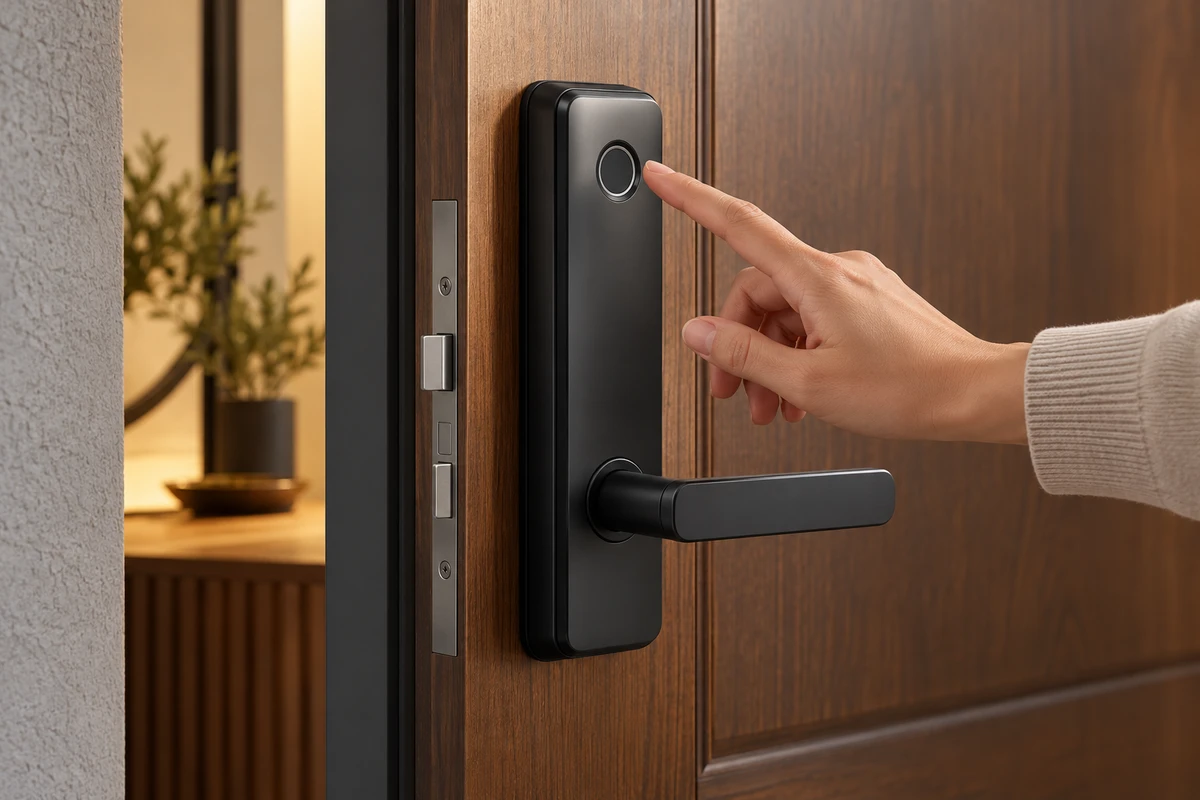
A fingerprint unlock should preserve a continuous action: the finger approaches and touches the sensor, the approved light or sound response occurs, the lock mechanism moves, and the user presses the handle and opens the door. A close-up may clarify the sensor, but a medium shot should restore the relationship between hand, handle and door.
If the sequence is cut too finely and all sound is rebuilt, viewers see attractive fragments without knowing whether they belong to the same operation. Record the keypad, prompt, lock body and door sounds separately on set. Post-production may clean noise, but it should not invent an immediate response the sample did not produce. The product owner approves sequence and state; the editor approves rhythm.
3. Scale and installation shots: place dimensions in context
An isolated turntable shot rarely tells buyers how a lock will sit on a real door. Keep at least one medium shot of the full door area so viewers can judge handle height, inner and outer panel position and hand scale. Add a side or door-edge view to clarify the relationship between the panel, door leaf and bolt.
Door thickness, handing and lock-body conditions vary by model. The official Schlage Encode product page lists exterior and interior dimensions, compatible door thickness and backset separately. That is a useful production reminder: a dimension is not a decorative number to add in post. It belongs to a particular model and installation condition. For a hypothetical project, every door, lock body and measurement shown must come from the brand's approved materials.
4. Lifestyle shots: give the product a task, not just a set
Choose one concrete routine. A resident arrives carrying groceries, puts one bag down, authenticates, waits for the approved response and opens the door. The performance does not need to exaggerate “convenience.” Natural blocking, a credible pause and a clear product position are enough to explain the lock's role.
Light art direction can create a brand world through door colour, wall texture, entryway lighting and wardrobe. Props must not obscure the operation, and paid talent should not be presented as an unsolicited consumer testimonial. If the interior is a studio set, treat it as a set; do not imply that it is a real home or local shoot in the target market.
Hero and detail-page edits need different rhythms
One production can share appearance, operation and lifestyle material, but the edits have different jobs.
| Version job | Shot and approval priority |
|---|---|
| Hero or first-screen short video | Establish product identity and one important use action quickly; remain understandable without sound; avoid giving every feature equal time. |
| Detail-page or explainer video | Organise appearance, installation, operating steps and applicable conditions by buyer question; give actions enough time; let captions and voiceover describe only what the image genuinely supports. |
For example, the hero edit might open with the panel waking and one complete door-opening action, then finish on a finish detail. The detail-page edit can first establish the inner and outer panels in relation to the door, then demonstrate fingerprint, PIN and key access separately. Each method still needs an approved state; a collection of different hand close-ups does not prove a broad feature set.
If vertical social assets are also required, write a different opening and subject distance. A vertical version is not a central crop of the horizontal master. The hand, panel and feedback area need to remain visible together, and the blocking must be redesigned for closer viewing.
AIGC can extend atmosphere, not rewrite product facts
AIGC can help test non-functional environments before the shoot: different entryway palettes, seasonal light or background extensions. It can also support post-production atmosphere when the lock's structure is not altered. The following elements should remain live-action or controlled composites approved by the product team:
- panel proportions, keypad layout, recognition area and bolt structure;
- the real response sequence after fingerprint input;
- door thickness, installation position and opening direction;
- any conclusion about speed, security, durability or compatibility.
Once a generated image changes finger placement, door gaps, bolt geometry or indicator behaviour, it is no longer merely a background replacement. Keep the live-action master, composite version and generated-source record. Content provenance can document how media was generated or edited, but it cannot replace product-owner approval of functional facts.
Use a four-layer review before approving the edit
Before principal photography, record one complete operation with a phone or low-cost test setup. It does not need final visual quality. Its purpose is to confirm that the information is continuous. Review the production in four layers:
- Appearance: Are silhouette, colour, finish and key structures distinguishable?
- Operation: Do the trigger, response, mechanical result and opening belong to one real action?
- Scale: Do the person, door and lock provide enough reference, without misrepresenting installation conditions?
- Context: Is the task natural, does the set support rather than obscure the product, and does the scene avoid implying unapproved features?
Reshoot the same action if a key response is missing, the sequence depends on editorial guesswork, the door scale is wrong, the sample state changes, or a vertical crop removes the product result. If the information is intact but the pace is slow, editing can solve it without sacrificing causality.
For a real project, review ONCE's ecommerce product video production service and published commercial and product work to see how hero imagery, functional demonstration and channel versions can be planned together. If you are preparing ecommerce content for a smart lock or another connected product, send the project brief with the model, channels, approved features, sample state, door conditions, timing and budget range. We can then define the shot responsibilities and production scope for this specific product.