A factory can feel enormous on site and still look like one wide room on screen. A drone passes over the roof. An ultra-wide lens stretches the aisle. The music grows larger. Yet the viewer still cannot tell how many people are working together, how the line actually moves, or how many steps a product crosses before it leaves the building.
The real task in factory brand film production is not to make a space look bigger. It is to make scale comparable, traceable, and credible. The relationships between people, machines, materials, and time often communicate more than a spectacular empty wide shot.
Scale begins as a relationship
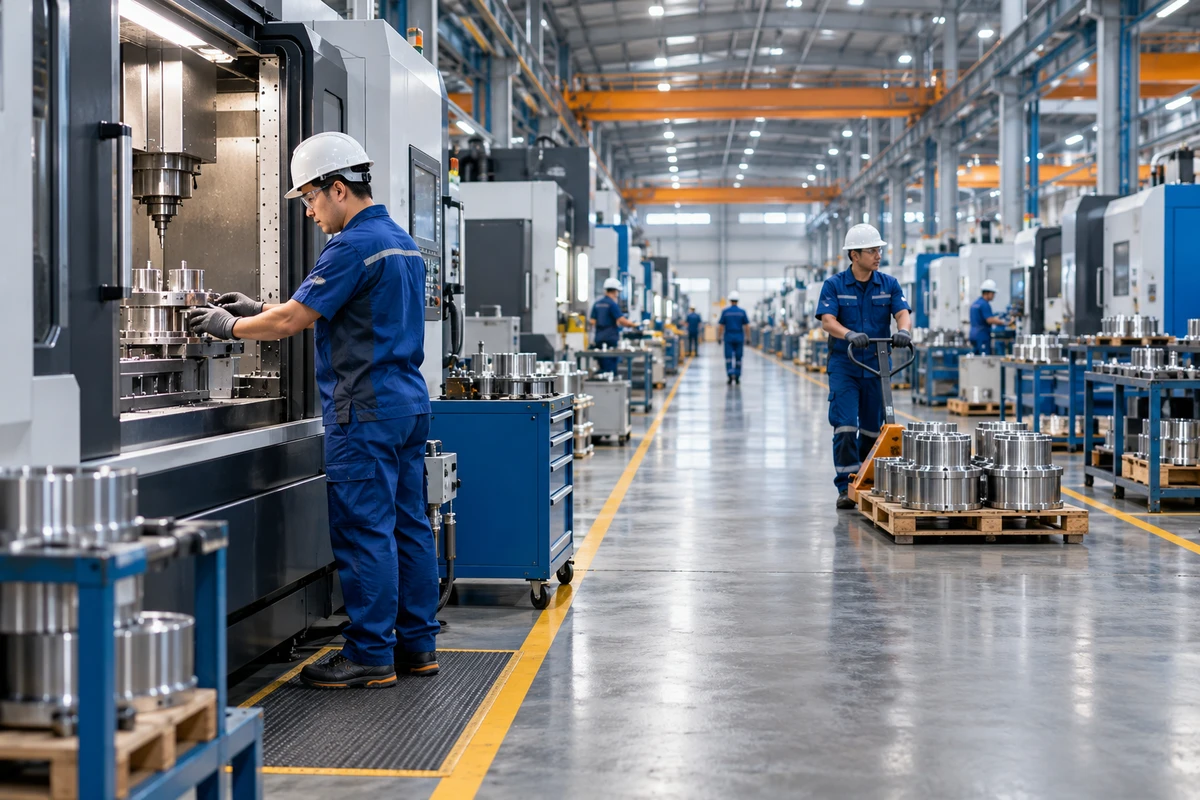
It is difficult to judge the size of a wall, machine, or production hall without a familiar reference. Place an operator beside the equipment, let a forklift cross the aisle, or follow a standard pallet from the foreground to a distant rack, and the viewer gains a usable measure of height, distance, and density.
Research on relative size perception also shows that objects are not perceived in isolation; surrounding size, distance, and arrangement influence how a target is judged. In a factory film, that means grandeur cannot rest only on low angles and wide lenses. A stable sense of scale comes from recognizable relationships.
Ask three questions before building the shot list:
- Is there an object or person whose size the audience already understands?
- Is that reference doing real work, rather than posing in the frame?
- Does the next shot preserve direction, a person, or a material flow so the spatial relationship continues?
Build one route the audience can follow
Factory films often contain many attractive shots with no geography between them. The gate, workshop, laboratory, and warehouse each appear once, but the edit feels like a slideshow of unrelated departments. The viewer sees the facility without understanding the system.
A stronger approach is to choose one main route. It does not have to cover the entire site, but it needs a clear beginning, process, and end: materials arrive, enter a key production stage, pass inspection, and move to packing or dispatch. At every major location, begin with a shot that contains the environment, people, and essential action before moving into hands, instruments, surfaces, and process details.
Adobe's explanations of the master shot and continuity editing make the same underlying point: a master shot establishes the relative positions of people, actions, and space, while continuity techniques keep viewers oriented as the edit moves closer.
Let movement carry the viewer into the next space
Material flow is a natural editing guide. A pallet truck exits frame right and enters the next shot from the same direction. An operator lifts a component and the next shot catches it landing at inspection. The sound of a machine begins before the picture cuts to the next stage.
When the facility covers a large area, one worker, one colored tote, or one batch of product can serve as a moving coordinate. This does not turn the film into a character story. It simply gives the audience a stable point of reference.
Wide lenses can enlarge space and exaggerate it
Ultra-wide lenses can make an aisle feel deeper. In its description of the Ultra Prime 8R, ARRI states that extreme wide-angle perspective exaggerates depth and motion and can make a space appear larger than it is. That is an expressive property, not an objective measurement.
A factory film should therefore avoid treating the widest lens as proof of scale. Move the camera too close to a worker and the foreground body, tool, or machine expands while distant workstations shrink. Push a low camera through a corridor and an ordinary passage can become a dramatic tunnel. The image may feel powerful, but it can weaken trust if a site visit reveals a very different spatial relationship.
A more credible approach is to:
- choose a camera position that explains the real relationship before choosing focal length;
- keep people, doors, pallets, or standard equipment in wide shots as references;
- capture a master, medium coverage, and details in the same space instead of relying on extreme perspective throughout;
- check any image that could imply capacity, floor area, or equipment count against the real facility.
Scale can be designed, but “looks like more” must not replace “is more.”
Repeated workstations communicate more than empty floor area
Open space is not the same as manufacturing capacity. A huge hall without people or material flow can feel like a real-estate tour. Three connected workstations, coordinated actions, and semi-finished products entering and leaving the frame make production feel active and legible.
Look for four forms of repetition:
- Spatial repetition: similar workstations extend into depth with clear foreground, middle ground, and background.
- Action repetition: different people perform comparable actions at adjacent stages.
- Temporal repetition: one material changes as it moves through production, inspection, and packing.
- Sound repetition: a stable mechanical rhythm crosses spaces, with clear changes at important stages.
Visual density is still not production data. A film may honestly show the number of stations and their working state, but rapid editing alone should not imply an unverified daily output. Any exact capacity figure in narration or captions needs a confirmed definition and date.
Sound restores distance beyond the frame
Factory scale is heard as well as seen. A press echoing from another bay, a forklift approaching from the distance, or footsteps changing across floor materials can imply that space continues beyond the picture.
Continuity editing often uses a sound bridge to introduce the next location before the image changes. In a factory film, an inspection beep can arrive before the cut to the laboratory; the packing line can continue underneath the transition into the warehouse. Sound is not just another layer of industrial atmosphere. It explains how one space connects to another.
Record clean wild tracks of key machines, room tone, and material-handling actions on location. If every machine is covered with the same generic effect in post, differences in distance, material, and weight disappear.
AIGC can extend expression, not factory evidence
Generative imagery can help visualize an internal process, an abstract data flow, or a transition that cannot be filmed. It should not stand in for evidence of manufacturing capability. A 2026 paper on multi-shot video generation still treats consistent appearance, spatial layout, and cross-shot state as core problems. Repeating the same text prompt does not guarantee stable machine positions, aisle widths, or worker actions.
When live action and generated shots are mixed, lock at least four things:
- the real floor-plan relationship and equipment count;
- wardrobe, PPE, and action direction;
- the actual state of the product at each production stage;
- which images are explanatory and which are meant to prove capability.
Generated images may clarify an idea. Claims about real lines, certifications, testing, or manufacturing scale should return to verifiable footage from the site.
Turn scale into one verifiable action
A credible factory brand film does not have to keep telling viewers that the company is large. It can follow one person, one batch of material, or one product through a real route—from arrival to processing, inspection, packing, and departure. Space, time, people, and process all become visible along that path, and scale emerges without being announced.
If you are planning a manufacturing brand film, start with the floor plan, core processes, logistics route, and approved operational facts. Then explore ONCE's video production approach to turn them into a route that viewers can understand and buyers can trust.