One egg, one successful grasp, and three seconds of slow motion have become a familiar opening for dexterous-hand product videos. The image quickly suggests delicacy, but buyers soon ask harder questions. What changes with a slippery metal part, an off-center tool, or a paper cup that deforms? If the first contact is poor, does the hand regrasp, adjust the object in-hand, or drop it?
The starting point should therefore be an object matrix, not a search for the most dramatic prop. Each object should expose a different grasping problem. The camera then preserves approach, first contact, force adjustment, in-hand reorientation, and task completion. The egg can stay in the hero edit, but it is one cell in the matrix, not a stand-in for the entire hand.
Break “it can grasp” into separate questions
NIST’s work on robotic grasping separates grasp cycle time, grasp efficiency, finger strength, grasp strength, in-hand manipulation, slip resistance, touch sensitivity, and force tracking. This distinction is useful for production: one successful lift cannot prove speed, strength, delicacy, slip resistance, and object reorientation at the same time.
Before filming, product and marketing teams should choose the two or three capabilities the film must actually explain. For example:
- Lifting a soft paper cup without crushing it focuses on contact and force adjustment.
- Picking up an off-center tool and moving it into a usable pose focuses on center of mass and in-hand reorientation.
- Retrieving differently shaped parts from a cluttered bin focuses on changes in initial pose and grasp strategy.
- Holding an object through a small disturbance focuses on slip detection or disturbance resistance.
These capabilities may live in one campaign, but should not be compressed into the label dexterous grasping. The hero film makes the difference memorable. Continuous function clips make the motion understandable. The technical appendix records the object, starting pose, control mode, and approved state data.
Build an object matrix instead of choosing props by appearance
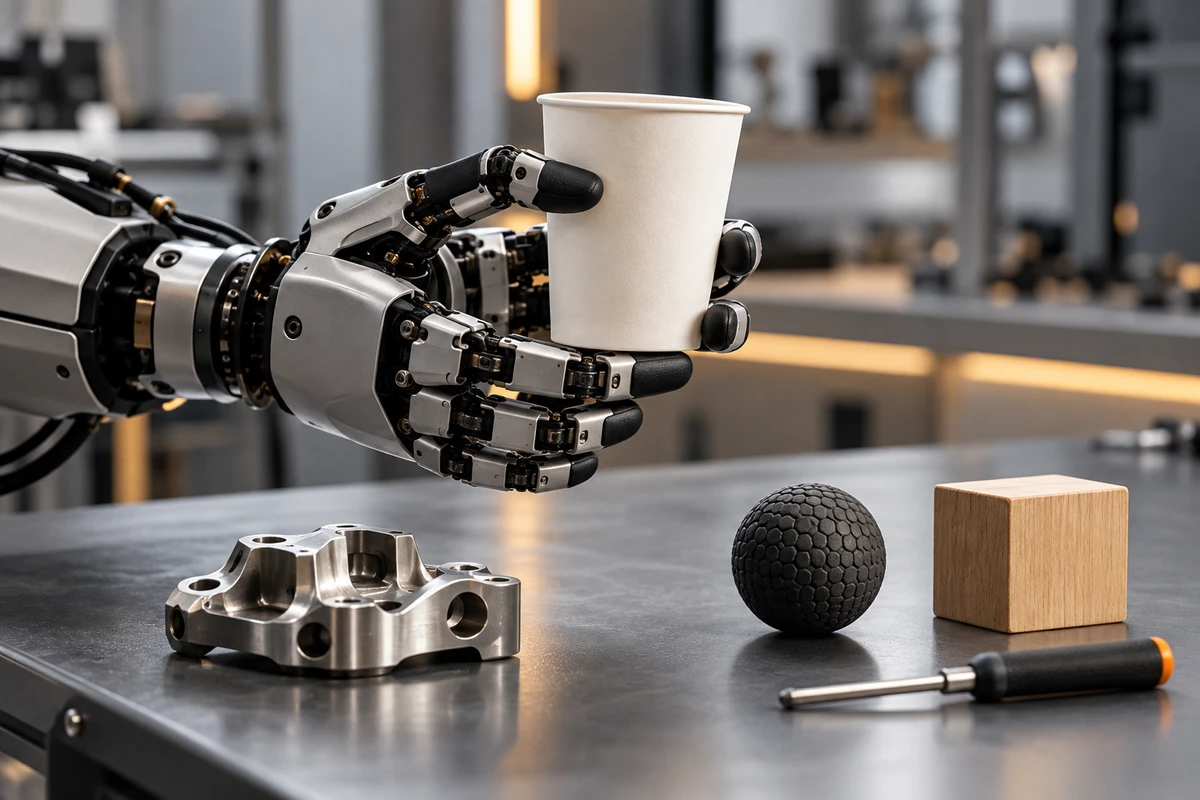
The prop set should cover four different changes rather than treating eggs, tomatoes, and strawberries as three separate tests of fragility.
| Object class | What the shot should answer |
|---|---|
| Rigid and regular | Can the hand establish a baseline grasp and produce a clear pose change? |
| Rigid and irregular or off-center | How does the hand redistribute contacts so the object can be used after it is lifted? |
| Soft and deformable | Is deformation controlled, and does the hand change contact area or force? |
| Low-friction, slippery, or uncertain surface | Does the hand micro-adjust, regrasp, or recover after slip? |
Record size, mass, surface material, center of mass, starting pose, and final task. “Pick up a cup” is not specific enough. An empty paper cup and a filled cup, upright and sideways, lifting and pouring, create different requirements. The more theatrical the object, the more important it is to state the conditions. Otherwise viewers remember the prop and learn little about the product.
Renesas organizes its official dexterous-hand demonstration around object differences: the system identifies different objects, calibrates grip force across fingers, and handles items ranging from solid produce to paper cups and eggs. That demonstration does not prove another product’s performance. It does show a useful content principle: objects should trigger distinct control problems, not serve as decoration.
Preserve four continuous phases of every grasp
Much of a dexterous hand’s value appears before the object leaves the table and after the first secure hold. When an edit keeps only the finger-closing moment, the most informative contact changes disappear.
Approach
Show the relationship among palm pose, finger preshaping, and the object. Does the hand wait until the final moment to change shape, or prepare earlier from the object’s geometry? If external vision is involved, make the camera-object-hand relationship visible instead of relying on an unverifiable detection overlay.
First contact
Use a side or macro view to show which finger contacts first, whether the contact point changes, and whether the object moves. Do not choose a front view that hides every contact just because it looks symmetrical. For translucent, reflective, or soft objects, the contact edge and deformation often explain more than another mechanical close-up.
Force adjustment and contact switching
Some systems redistribute finger contact or change grip force after initial contact. Keep the object visible so viewers can see whether it slides, rotates, or deforms. A technical edit may add approved tactile, joint, or force states. The Shadow Dexterous Hand specification describes pressure tactile sensors in the fingertips and access to joint-position, force, and other internal data. This does not mean every hand has the same sensing. It shows why only real product output with confirmed meaning should enter the graphic layer.
Task completion
Lifting is not always completion. When the product claim involves in-hand manipulation, continue through rotation, face change, pressing, insertion, or handoff. OpenAI’s Dactyl work defined the task as reorienting a block or prism in the hand, and discussed occlusion, friction, slip, and partial observations. An attractive pickup shot cannot substitute for that later control problem.
State data can explain motion, but cannot replace it
Once fingers occlude an object, an external camera may no longer reveal whether contact is stable. NIST notes that external vision is commonly occluded during grasping, making object-pose estimation useful for in-hand manipulation and hand-arm coordination. Tactile, force, joint-position, or object-pose data can help explain the action, but the film must first answer three questions: is the data from the real run or an offline replay, is it synchronized with the picture, and what does the value actually mean?
A restrained graphic layer is often more useful than a wall of curves. Show only approved states such as first contact, slip tendency, grip adjustment, and stable hold. If the visualization is a post-produced explanation, label it as explanatory graphics rather than product telemetry.
Tactile sensing is also not necessary for every manipulation method. In its published Dactyl work, OpenAI stated that although the hand had fingertip touch sensors, the policy did not use tactile input. A video should explain what this product actually used in this task, not turn the presence of a sensor into a causal claim.
Treat failure as part of the object matrix
Failure means more than dropping an object. It can include a shifted contact point, pushing the object outside the workspace, excessive deformation, gradual slip, a grasp that blocks the next step, or an adjustment that exceeds joint or control limits.
For each object class, keep at least one real failure or recovery segment in the internal log. Record:
- Whether the problem occurred during approach, contact, lift, or in-hand manipulation.
- Whether the system detected it.
- Whether recovery used automatic release and regrasp, in-hand adjustment, or human reset.
- Whether recovery changed object position, program, control mode, or camera conditions.
- Whether the clip belongs in the hero film, technical edit, behind-the-scenes material, or acceptance record only.
A brand film does not need to show every miss. But if recovery is a product claim, a caption saying adaptive is not enough. One continuous recovery is more informative than combining three different attempts into a perfect move. If the project needs to claim success rate or cross-object generalization, the engineering or test team must define samples, repetitions, and pass criteria. Production footage cannot replace a statistical test.
Give three deliverables three different jobs
The 30- to 60-second hero film begins with object differences and shows how grasp strategy changes with the task. It avoids a wall of parameters and does not imply that every object used identical conditions.
Continuous function clips keep one key object visible from approach to task completion with few or no hidden cuts. Each clip records the object, starting pose, control mode, and human intervention. These clips support sales meetings, media kits, and technical follow-up.
The object and shot log records prototype version, software, end-effector configuration, object conditions, file names, failures, and recoveries. It may stay private, but it keeps later edits, localized versions, and future shoots aligned.
For a wider view of product-feature storytelling, see ONCE’s guide to showing product features clearly. The same production principle applies: each claim needs a visible action and consequence.
Before the shoot, replace “film the hand picking up an egg” with an object matrix and a four-phase action sheet. The crew will know what to preserve, and the product team will know how far each shot can speak.
If you are preparing a video for a dexterous hand, robotic end effector, or embodied-AI product, share the approved object range, control mode, sensor states, and three tasks the film must explain with ONCE. We will define the object matrix and continuous shots before deciding what belongs in the hero film, function clips, and technical appendix.