A product in an AI-created scene can become warmer, darker, or catch a new highlight. Its spout should not become longer, and a seam should not quietly disappear. Preserving the real product does not mean freezing every pixel of its photograph. It means distinguishing the effects of this particular lighting setup from the features of the object itself.
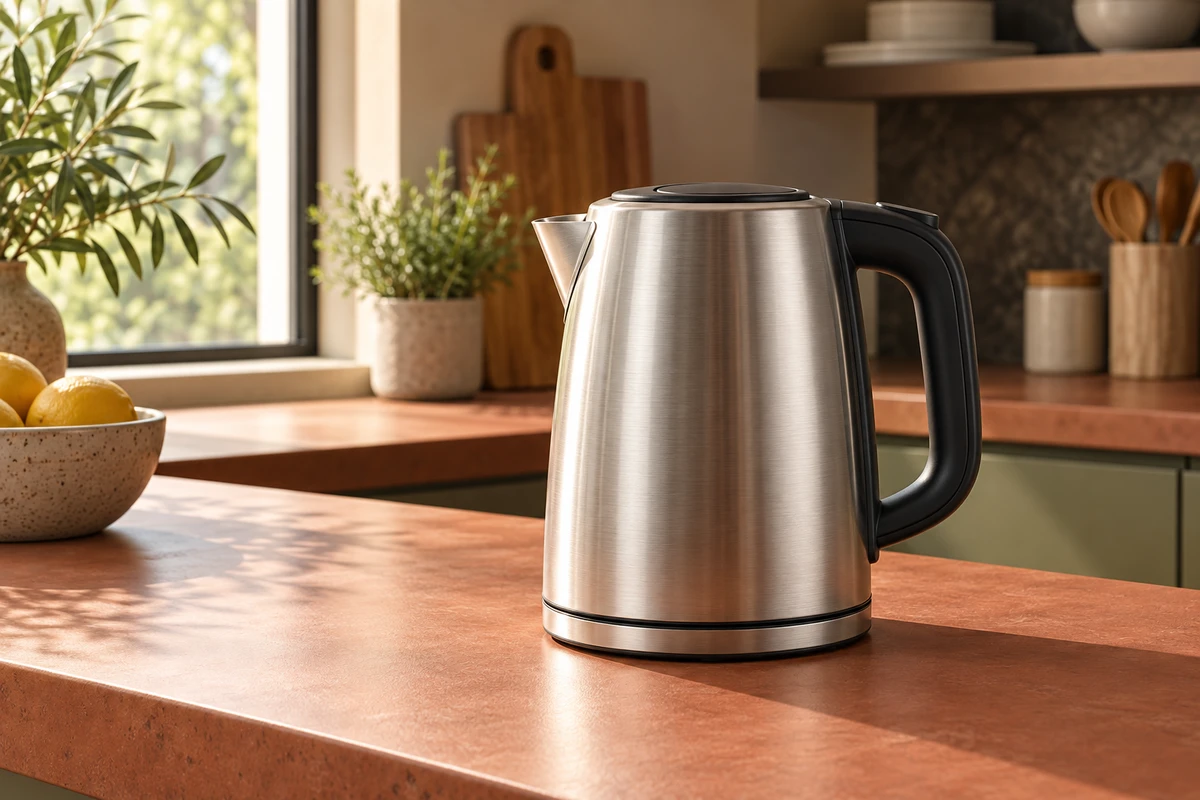
Imagine a brushed-metal electric kettle photographed on a white studio table, then placed in an afternoon kitchen. This is a fictional creative scenario, not a client project. The window light is warm and the counter reddish, but the kettle still carries the large white reflection from the original studio. Even with a clean cutout, it may look pasted in. The problem may not be a lack of background detail: the product is still carrying the light of another room.
Two meanings of keeping the product unchanged
One approach preserves the product layer and generates only its surroundings. This works when the source photograph's viewpoint and lighting can plausibly belong in the new setting. Another preserves the identity of the merchandise while allowing its illumination and relationship to the environment to change. These are different creative requirements.
Adobe's Harmonize product explanation says the added object is recreated through generative AI with tones and lighting that match the scene, alongside shadows or reflections around it. We checked the page on October 18, 2026. This is the manufacturer's description, not a product-fidelity guarantee established by our own testing.
“Change only the background and leave the product completely untouched” cannot ambiguously mean both things. If the original pixels must stay unchanged, choose a setting that accommodates their existing highlights, viewpoint, and silhouette. If relighting is allowed, separately assess whether the product has been reshaped. A more convincing blend does not answer that second question.
For the fictional kettle, a warm reflection near the window could be an interpretation of the new light. Turning fine brushed metal into smooth chrome, or changing the curve of its black handle, alters the product. Not every mismatch is a vague “AI look,” and not every alteration can be explained away as lighting.
Decide whether the scene or the photograph adapts
When only one approved product photograph is available, adapting the scene to it often provides clearer direction than repeatedly asking a model to make the result natural. Examine how much of the lid is visible, which side is brighter, and the shapes of existing reflections. Then choose a surface and setting compatible with those relationships.
Adobe Learn's What makes amazing creative compositing, published June 11, 2026, discusses lighting direction and quality alongside perspective, scale, and framing. It recommends compatible viewpoints for the elements. The useful principle is not that every image needs identical lighting, but that the parts of a composite must describe one coherent space.
If the source photograph clearly looks down onto the lid, shrinking the kettle will not reveal its real underside for a low-angle kitchen scene. A generator may produce an attractive new view, but unseen product details do not become reliable information because the result looks good. Choose a scene that suits the source, or photograph the required angle, rather than treating an invented view as established fact.
Conversely, if window light and a low viewpoint are central to the concept, prepare the product photography for them. Establish the intended viewpoint and dominant lighting character, then capture suitable material. A live-action and AI hybrid need not begin with one supposedly universal white-background shot that leaves every difficult decision to generation.
Look at one image against two references
A scene image needs two kinds of attention. Viewed as a whole, does the product belong in this space? Viewed closely against the merchandise, is it still the same object? One concerns relationships; the other concerns identity. Neither can substitute for the other.
For the fictional kettle, compare the new image with the source at the spout, lid rim, handle attachments, and base. Do not demand identical brightness pixel by pixel. Ask whether a change adds light and shade to the same form or replaces the form itself. A real seam becoming less conspicuous in shade can make sense; a seam regenerated as uninterrupted metal needs another look. Where a photograph cannot settle the question, consult the sample or reliable product information instead of inventing the answer.
Then return to the complete kitchen. Is the contact with the counter clear? Can the highlights be plausibly explained by the surrounding light? A warm setting does not require every part of the kettle to become the same orange. The tonal differences that communicate the material should not disappear under a unifying grade.
Adobe Research's The research behind Harmonize, dated October 31, 2025, distinguishes foreground relighting, background shadow and reflection generation, and boundary blending. That distinction is useful: a pasted-in appearance can arise at different levels, without requiring the entire product to be regenerated each time. We have not tested the tool comparatively, and its official examples do not establish automatic success with every material.
Let the real product shape the idea
Product constraints can give an image its character. If the source kettle photograph has a broad, gentle highlight, an overcast window scene may be more suitable than hard sunset light. If small markings must remain readable, give them a separate photographed close-up rather than asking one atmospheric image to explain the entire product.
This does not mean every project must start with photography. Early concepts can allow substantial visual changes, provided they are clearly identified as concepts rather than accurate merchandise images. When the work begins representing a specific product, reconnect the imagined scene with the product information. Nor does a convincing still establish that a video works: rotation may reveal changing shapes, jumping highlights, or drifting contact that only becomes visible over the complete action.
An AI background is most useful when it places a product in a situation worth looking at, not when it erases difficult characteristics. Bring an original product image and a target setting to ONCE's live-action and AIGC production solutions to discuss which relationships can be relit and which features must remain determined by the real object.
This is original creative-method analysis, not a software, photography, or advertising-performance test. The kettle and cover are independent AI concepts, not an actual model. Sources checked October 18, 2026. Mainland China access to the overseas sources was not tested; the Chinese edition retains accurate source names, titles, and available dates without unverified overseas links.